 ET Online(Representative image) How to file ITR-1 online: A step-by-step guide for salaried taxpayers also having income from house property, LTCG and other source under new tax regime
Many salaried employees use ITR-1 to file their tax returns since they don’t usually have complex income sources. This year, the Income Tax Department extended the deadline for filing ITR from July 31, 2025, to September 15, 2025, for FY 2024-25 (AY 2025-26).
ET Wealth Online spoke to Tarun Kumar Madaan, a senior consultant at Coherent Advisors, who shared a step-by-step guide on how salaried employees can file their tax returns on the income tax e-filing portal.
Eligibility to file ITR-1
The ITR-1 Form is for Ordinary Resident (ROR) Individuals who have a total income of up to Rs. 50 lakh. This includes income from salary, income from one house property and other sources like bank interest, dividends, and agricultural income up to Rs 5,000.
This year, the tax department has revised the eligibility criteria for those taxpayers who can use the ITR-1 form. Now, taxpayers with long-term capital gains (LTCG) of up to Rs 1.25 lakh from listed shares and equity-oriented mutual funds can also file their tax returns using the ITR-1 form.
Different ways to file ITR-1
You can file your income tax return in two ways on the income tax e-filing website – using either Excel utilities or Java utilities, or you can do it directly on the e-filing platform.
When you file your ITR directly on the income tax e-filing website, it automatically fills in your basic information and tax details into the ITR-1 form without any manual intervention, which really saves your time and effort.
Step-by-step guide to file ITR-1 online on income tax e-filing website
Madaan provides a step-by-step guide to file ITR-1 online for a salaried taxpayer who has opted for the new tax regime:
Step 1: Visit http://www.incometax.gov.in. Here, click on Login. A new webpage will open on your screen. Enter your PAN/Aadhaar and password to log in to the portal.
Step 2: Once logged in, the income tax portal will show the ITR filing webpage. Alternatively, go to E-File > Income Tax Returns > File Income Tax Return from the menu.
Step 3: Select assessment year 2025-26 (current AY), mode of filing – online and click on continue. The assessment year is the year in which income earned in the previous financial year is assessed.
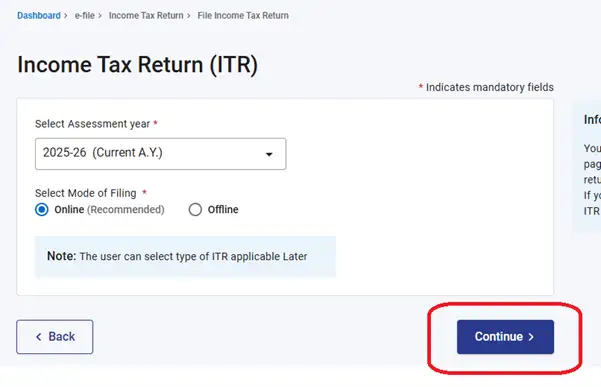
Step 3
Step 4: A new webpage will open. Select ‘Start New filing’, select status as ‘Individual’ and click ‘Continue’.
Step 5: Next, you have to select the ITR form. Select ITR-1 and click on ‘Proceed with ITR-1’. Select ‘Let’s Get Started’ to proceed with this year’s ITR filing. Remember to keep your documents, such as Form 16, interest certificate, and others, to make the ITR filing process easier.
Also Read | Documents you need to file your ITR this year
Step 6: Select the reason for ITR filing. Here we have selected, “Taxable income is more than the basic exemption limit”.
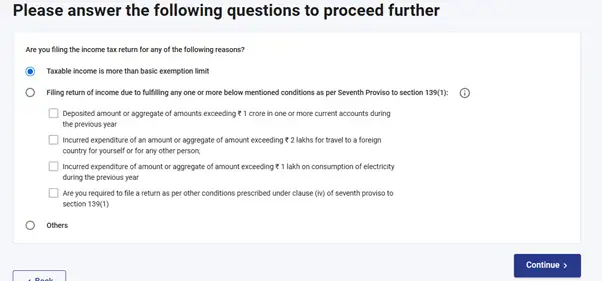
Step 6
Taxpayers need to keep in mind that the new tax regime is the default one. If they want to change tax regime, they can do so in the personal information section as outlined below.
Also Read | ITR filing is mandatory even if gross taxable income is below basic exemption limit
Step 7: A new webpage will show the following sections:
a) Personal Information
b) Gross Total Income
c) Total Deductions
d) Tax paid
e) Verify your tax liability details
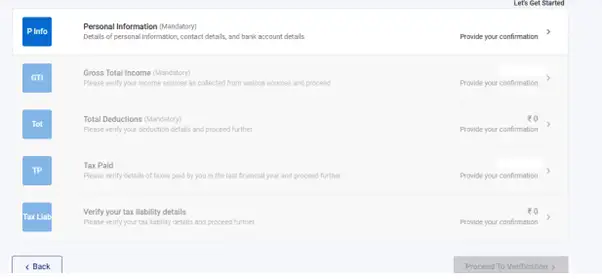
Step 7
Also Read | Which tax return form applies to your income?
Section 1: Personal Information
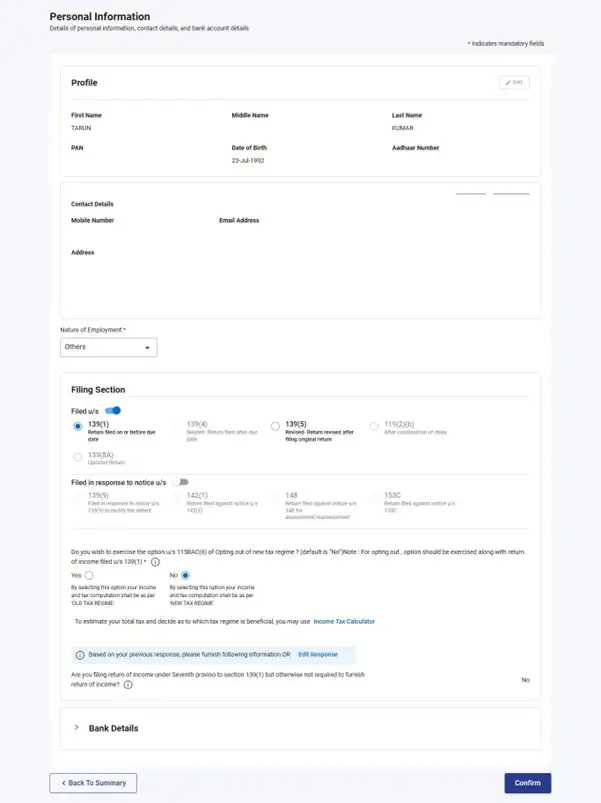
This section shows your personal details such as name, PAN, date of birth and others. You can also edit your contact details here. In this section, you need to select the nature of employment, ITR filing Section 139(1), tax regime option (YES/NO). You should also check your bank account details to ensure that all bank accounts held by you between April 1, 2024, and March 31, 2025, are reported in your ITR.
Step 8
Section 2: Gross Total Income
This section shows the gross total income of a salaried taxpayer from various sources such as income from salary/pension, interest income, dividends, LTCG from listed equity, equity mutual funds, etc. In the online ITR form, most of the columns are auto-filled from Form 16, Form 16A, Annual Information Statement, etc.
A taxpayer should verify the auto-populated information in the ITR form. If not populated, details are required to be entered manually.
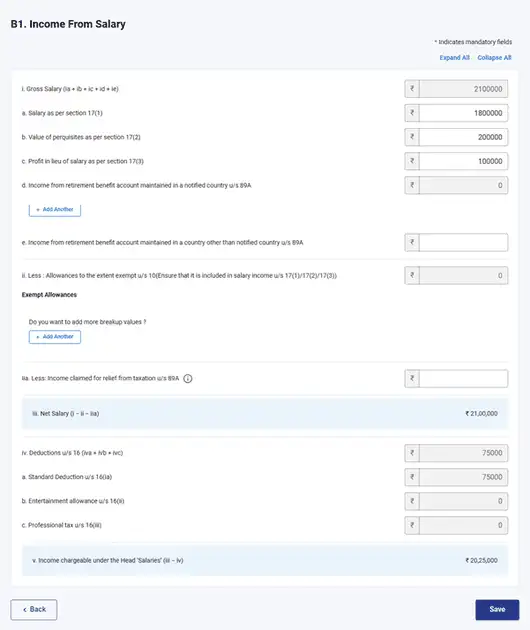
Reporting of salary income in ITR-1: The columns for reporting salary income in ITR-1 form are the same as how salary income is shown in the Form 16. Click on the edit button on the right-hand side to edit salary income.
Assuming a salaried individual opts for the new tax regime for ITR filing for FY 2024-25 (AY 2025-26), the salary details will be reported as follows:
- Gross salary –
- Less: Allowances exempted u/s 10
- Less: Income relief claimed u/s 89A
- Net salary
- Less: Standard Deduction
Income chargeable under the head Salaries
Under the new tax regime, a salaried taxpayer can claim a standard deduction of Rs 75,000 from salary income. Further, allowances such as House Rent allowance (HRA), Leave Travel allowance (LTA) are not allowed under the new tax regime.
Reporting of one house property income: The ITR-1 form allows a taxpayer to report income from one house property only. If the taxpayer occupies the house, then it will be considered as ‘Self-occupied property’.
On the other hand, if the house was on rent during FY 2024-25, then rental income is required to be reported in the ITR form. Here is an example of how rental income from house property will be reported.
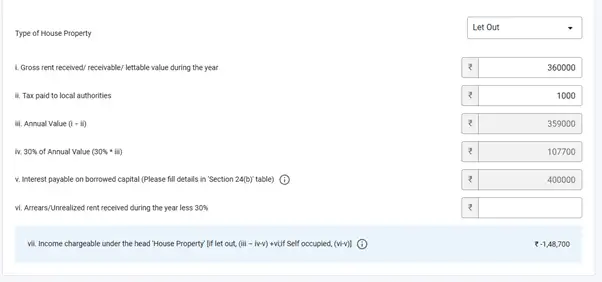
Suppose you have earned rental income of Rs 3.60 lakh, paid house tax of Rs 1,000 and have interest on home loan of Rs 4 lakh. From the drop-down menu, select ‘let-out property’. Reporting of income will be done as follows:
| Gross rent received | Rs 3,60,000 |
| Tax paid to authorities | (Rs 1,000) |
| Annual Value | Rs 3,59,000 |
| 30% of Annual Value | (Rs 1,07,700) |
| Interest payable on borrowed capital | (Rs 4,00,000) |
| Arrears received during the year less 30% | NIL |
| Income chargeable under House property | (Rs 1,48,700) |
House Property
Madaan says, “Under the new tax regime, a taxpayer can claim 30% standard deduction on annual value as well as deduction for interest paid on home loan in specific cases. No deduction for interest on housing loan is allowed if the house property is self-occupied. For let-out properties, there is no upper limit on the deduction for interest on a home loan, it is permitted even if the interest exceeds the annual value of the property. But under the new tax regime, the total income is computed without setting off any loss under the head ‘Income from house property’ against income from any other head.
In the example above, even though the interest on the home loan results in a loss of Rs. 1,48,700, this loss can’t be offset against any other income if the taxpayer is following the new tax regime. So, even though the total home loan interest amounts to Rs. 4 lakh, only Rs. 2,51,300 is effectively utilised.
The interest must be reported separately under Section 24(b), along with the following details: name of the bank or financial institution, loan account number, date of sanction, total loan amount, outstanding loan amount, and interest paid on the borrowed capital.”
Taxpayers should remember that rent arrears received are taxable in the year of receipt under the head “Income from House Property.” A standard deduction of 30% of the arrears or unrealised rent is allowed from such rental income. However, ITR-1 does not provide the option to show a 30% deduction for arrears separately. Therefore, the taxpayer should report only the taxable portion of the rent arrears received during the year, which is the arrears of rent received minus 30%.
Reporting of income from other sources: In this section, a salaried taxpayer needs to report income from other sources such as interest income from savings accounts, fixed deposits, Sovereign Gold bonds, among others, dividends from listed shares, equity mutual funds and any other income that is not taxed under any other head.
The online ITR-1 form automatically populates the other incomes from AIS. However, a taxpayer is required to ensure that all taxable incomes are reported.
Reporting of exempt income
During the financial year, a taxpayer can receive certain types of income which are tax-exempt. Still, it’s important for taxpayers to report this income to avoid any tax notices due to underreporting of income. Examples of exempted incomes include– the maturity amount from a Public Provident Fund (PPF), EPF withdrawal amounts (under specified conditions), the maturity amount from a life insurance policy, among others.
To report exempted income, click on the head – ‘Exempt Income: For reporting purpose and Income on which no tax is payable’. Here, click on ‘Add another’.
A new webpage will open on your screen. From the drop-down menu, select the nature of income and enter the amount in the corresponding column. Once the exempted income is added, click on save.
LTCG under Section 112A not chargeable to Income Tax
As mentioned above, this year, the ITR-1 form allows reporting of LTCG from listed shares and equity mutual funds. The reporting can be done provided LTCG does not exceed Rs 1.25 lakh. It is important to note that no tax is payable on the LTCG from listed shares and equity mutual funds if the gains are less than Rs 1.25 lakh in a financial year.
In this section, a taxpayer is required to mention the sale value and cost of acquisition.
Madaan says, “Once the taxpayer enters the sale value and cost of acquisition, the ITR-1 form automatically calculates the LTCG. If the LTCG value exceeds Rs 1.25 lakh, then the taxpayer will not be able to file ITR-1.”
Section 3: Total deduction
In the next section, a salaried taxpayer can claim deductions that he/she is eligible for. The new tax regime does not allow claiming of any deduction except under Section 80CCD (2) and 80CCH. The deduction under Section 80CCD(2) can be claimed if, during the financial year, the employer has deposited a contribution to the employee’s NPS account. A salaried taxpayer can claim a maximum deduction of up to 14% of basic salary under the new tax regime.
The deduction under Section 80CCH is available for contributions made to the Agniveer Corpus Fund. Individuals enrolled in the Agnipath Scheme (‘Agniveers’) can claim this deduction for the amount contributed to the fund. However, this benefit is restricted to those employed under the ‘Central Government’ category and is not available to individuals in any other form of employment.
Once the deductions are entered, the ITR-1 form automatically calculates the net taxable income.
Section 4: Tax paid
This section will show the taxes that are deducted from income or collected from expenses in the FY 2024-25 (AY 2025-26). This section is auto-populated from Form 26AS and AIS. This includes TDS from Salary, TDS on other incomes, TCS, Advance Tax, and Self-Assessment Tax.
A taxpayer should cross-check Form 26AS, AIS, TDS certificates such as Form 16, Form 16A and the tax paid section. Cross-checking will ensure that there is no mismatch in the tax amount deducted and deposited to the government.
Madaan says, “A taxpayer needs to contact the deductor for correction if there is a mismatch in the tax deducted/collected amount and tax deposited amount.”
Section 5: Verify your tax liability
In the last section, a salaried taxpayer needs to review their final tax liability. This is automatically based on the net taxable income, tax paid and balance tax pending (if any). If you have an income tax refund due, it will be shown here.
Step 8: ITR verification: Submitting your ITR isn’t the final step in the ITR filing process. It needs to be verified as well. The ITR must be verified within 30 days after submission. The Income Tax Department will only start processing the tax return after the taxpayer has completed verification. You can verify your income tax return through different methods, including a Digital Signature Certificate (DSC), an Electronic Verification Code, an Aadhaar-based OTP, or by mailing a signed copy of the acknowledgement to CPC Bengaluru.
After verification, you will receive an SMS and/or email confirmation that your ITR has been successfully filed. Now, the Income Tax Department will start processing the ITR. You will receive an intimation notice once your ITR is processed.
 aniltikotekar4sme.com